
Key facts
- Brand
- Analog Devices
- Model
- AD7739
- Industry
- Industrial
- Documents
- 3
- Languages
- EN
- Last added
- 2012-08-02
Start here
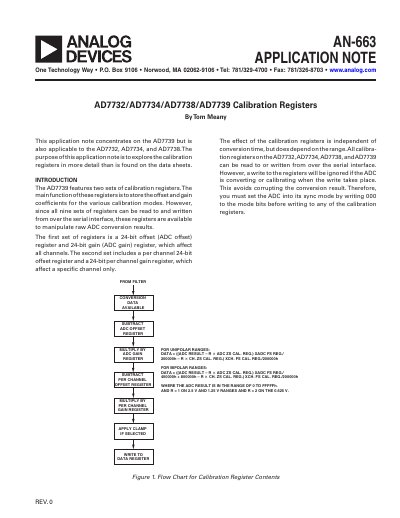
Analog Devices AN-663 AD7739 Calibration Registers Application Note
This document explains how to manipulate raw ADC conversion results by reading from and writing to the shared 24-bit offset and gain registers. It details the impact of these registers on all channels versus per-channel specific adjustments.
The note provides instructions for implementing a digital Programmable Gain Amplifier (PGA) using the per-channel gain coefficient, allowing users to achieve input ranges smaller than the lowest available analog range (+0.625 V). It includes mathematical methods and examples for picking coefficients to give a specific gain.
Analog Devices AD7739 specifications
| Supported Devices | AD7732, AD7734, AD7738, AD7739 |
|---|---|
| Offset Register Size | 24-bit |
| Gain Register Size | 24-bit |
| Default Offset Value | 0x800000 |
| Default Gain Value | Gain of 1 (0x800000) |
| Per Channel Gain Range | 0 to 8 |
Source: Analog Devices AN-663 AD7739 Calibration Registers Application Note
All Analog Devices AD7739 documents by type
Ratings, dimensions and ordering codes, for selection and design work.
How to use the product for one specific task, with worked examples.
Questions answered in these manuals
How do I write to calibration registers without corrupting conversion results?
You must set the ADC into its sync mode by writing 000 to the mode bits before writing to any of the calibration registers.
From: Analog Devices AN-663 AD7739 Calibration Registers Application Note
What is the effect of increasing the per channel offset register contents?
Increasing the offset register contents increases or decreases the output of all future conversions on that specific channel, depending on the sign bit.
From: Analog Devices AN-663 AD7739 Calibration Registers Application Note
What digital interfaces does the AD7739 support?
It uses a 3‑wire serial interface that is compatible with SPI®, QSPI™, Microwire™, and DSP interfaces.
What is the operating temperature range of the AD7739?
The device is specified for operation from –40 °C to +105 °C.
What is the operating temperature range of the AD7739?
The device is specified for operation from -40 °C to +105 °C.
Which digital serial interfaces can be used with the AD7739?
The AD7739 can be interfaced via SPI, QSPI, Microwire, and DSP‑compatible serial interfaces.