
Key facts
- Brand
- Analog Devices
- Model
- AD7843
- Industry
- Industrial
- Documents
- 4
- Languages
- EN
- Last added
- 2012-08-02
Start here
Analog Devices UG-062 AD7843/AD7873 Evaluation Board User Guide
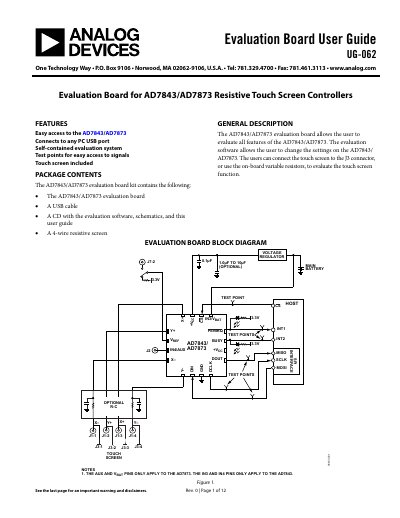
The AD7843/AD7873 Evaluation Board User Guide (UG-062) provides instructions for setting up and operating the evaluation board for the AD7843 and AD7873 resistive touch screen controllers. The kit includes the evaluation board, a USB cable, a 4-wire resistive screen, and software on a CD to configure and test the device.
Read onlineAnalog Devices AD7843 specifications
| Product Type | Resistive Touch Screen Controllers |
|---|---|
| Power Source | USB port or external power connector |
| Included Components | Evaluation board, USB cable, CD with software, 4-wire resistive screen |
Source: Analog Devices UG-062 AD7843/AD7873 Evaluation Board User Guide
All Analog Devices AD7843 documents by type
Ratings, dimensions and ordering codes, for selection and design work.
Day-to-day operation, settings and troubleshooting. Start here if the product is already set up.
Questions answered in these manuals
How do I power the evaluation board?
The board is powered via the USB connection to the host PC or through the J13-1 connector if jumper L5 is in Position A.
From: Analog Devices UG-062 AD7843/AD7873 Evaluation Board User Guide
What is included in the package?
The kit includes the evaluation board, a USB cable, a CD with software and schematics, and a 4-wire resistive screen.
From: Analog Devices UG-062 AD7843/AD7873 Evaluation Board User Guide
What is the maximum throughput rate of the AD7843?
The AD7843 can operate up to 125 kSPS maximum throughput.
What supply voltage range does the AD7843 support?
It works from a single supply of 2.2 V to 5.25 V.