
Key facts
- Brand
- Philips
- Model
- Xenium 9@9
- Category
- Cell Phones
- Industry
- Electronics
- Documents
- 23
- Languages
- ZH
- Last added
- 2026-10-18
Start here
Philips Xenium 9@9 Series Phone User Manual
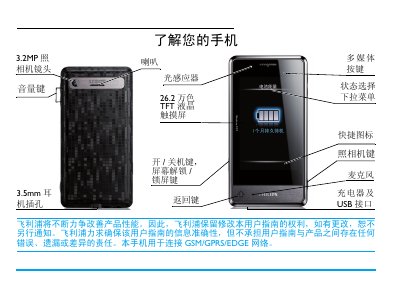
This manual introduces the Philips Xenium 9@9 mobile phone, covering hardware features such as the 26.2‑wan‑color TFT touch screen, 3.2 MP camera, and 3.5 mm headset jack. It guides users through first‑time setup, SIM and micro‑SD insertion, and how to navigate the main menu and quick‑access icons.
Detailed sections describe making and receiving calls, sending messages, using multimedia functions, adjusting screen brightness, enabling power‑saving modes, and calibrating the included stylus. The final pages provide warranty information, environmental statements, and battery‑optimization recommendations. This manual is written in Chinese.
Philips Xenium 9@9 specifications
| Camera Resolution | 3.2MP |
|---|---|
| Model Number | Xenium X713 |
| SAR Value | 4.501 W/kg |
Source: Philips Xenium 9@9 User Manual
All Philips Xenium 9@9 documents by type
Day-to-day operation, settings and troubleshooting. Start here if the product is already set up.
- Philips Xenium 9@9 User Manual 31 p
- Philips Xenium 9@9 Series User Manual 19 p
- Philips Xenium 9@9 Phone User Manual 86 p
- Philips Xenium 9@9 Series Phone User Manual 91 p
- Philips Xenium 9@9 Phone User Manual 66 p
- Philips Xenium 9@9 Mobile Phone User Manual 86 p
- Philips Xenium 9@9 Phone User Manual 86 p
- Philips Xenium 9@9 Series Mobile Phone User Manual 23 p
- Philips Xenium 9@9 Series User Manual 30 p
- Philips Xenium X223 Phone User Guide 22 p
- Philips Xenium 9@9 Phone User Guide 35 p
- Philips Xenium 9@9 User Guide 35 p
- Philips Xenium 9@9 User Manual 32 p
- Philips Xenium 9@9 Phone User Manual 31 p
- Philips Xenium 9@9 Phone User Manual 31 p
- Philips Xenium 9@9 User Manual 31 p
- Philips Xenium X26 Phone User Manual 19 p
- Philips Xenium 9@9 Series Phone User Manual 32 p
- Philips Xenium 9@9 Series Phone User Guide 32 p
- Philips Xenium 9@9 Series Phone User Manual 32 p
- Philips Xenium 9@9k Mobile Phone User Guide 78 p
- Philips Xenium 9@9 Phone User Manual 29 p
- Philips Xenium 9@9 Phone User Manual 34 p
Questions answered in these manuals
What should I do if the phone battery is completely empty?
Wait a few minutes, usually not exceeding 5 minutes, for the charging icon to appear on the screen.
How can I optimize the battery performance of the Xenium 9@9?
Set the appropriate profile mode, close unused applications like Bluetooth or GPS, and avoid placing the phone near magnetic objects or metal surfaces.
How do I turn on the flashlight?
Slide the flashlight switch up to turn it on and down to turn it off.
How do I insert a Micro SD card?
Open the card slot cover, align the Micro SD card with the slot, and insert it.
How do I turn the phone on or off?
Press and hold the power key ( ) to turn the phone on or off.
How do I make a call?
Enter the telephone number using the numeric keypad and press ( to dial.