
This document describes the features and characteristics of Philips mobile phones, including the focus on improving product performance and ensuring the accuracy of the user guide. It also explains the operation of the phone's buttons, dynamic desktop, shortcut menu, and other functions.
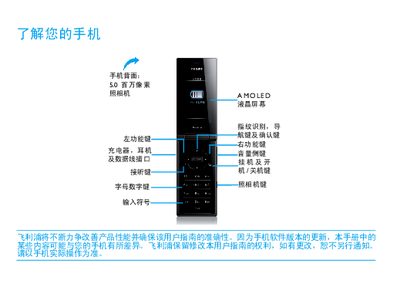
This manual guides you through the first use of your Philips Xenium 9@9 phone, including SIM card installation, battery charging, and inserting a Micro SD card. It also explains how to sync the phone with a computer and customize settings such as the clock, fingerprint registration, and scenario modes.
Further sections cover basic functions like making calls, sending messages, using multimedia apps, Bluetooth, and business features. Safety warnings, environmental information, and detailed troubleshooting steps are provided to help you maintain reliable operation. This manual is written in Chinese.
| Camera resolution | 5.0 million pixels |
|---|---|
| Display type | AMOLED LCD |
| Supported GSM bands | 900/1800/1900 MHz |
| SAR value | 0.534 W/kg |
Turn off the phone, remove the battery cover, take out the battery, then insert the SIM card as shown in the steps, and replace the battery cover.
Yes, you can use the phone while it charges, but once the battery is fully charged you should disconnect the charger to avoid over‑charging.
Remove and reinstall the battery, charge it until the battery icon stops flashing, then try turning the phone on again.