
This is a user manual for a Philips phone. It mainly introduces the phone's standby screen, buttons, shortcut menus, icons and symbols.
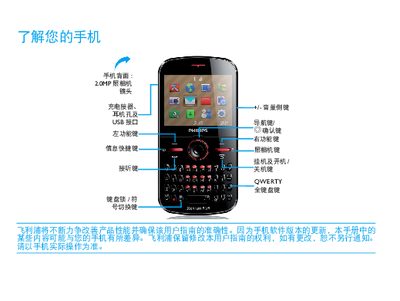
This manual introduces the Philips Xenium 9@9 series phone, describing its main hardware such as the 20MF camera, USB interface, QWERTY full keyboard, and dual‑SIM capability. It explains how to navigate the standby screen, use shortcut menus, and access common functions like music, messaging, and internet browsers.
The guide also covers essential procedures such as inserting SIM and Micro SD cards, charging the device, and safety precautions. A dedicated section provides tips for optimizing battery performance by adjusting scenario modes, disabling unused radios, and using original Philips accessories. This manual is written in Chinese.
| Camera | 20MF |
|---|---|
| Keyboard | QWERTY full keyboard |
| SIM capability | Dual‑SIM dual‑standby |
| Expandable storage | Micro SD card slot |
Adjust the scenario mode, disable unused functions such as Bluetooth, Wi‑Fi and GPS, close background apps, and use only original Philips accessories for charging.
Connect the charger until the battery is fully charged, then unplug the charger; leaving the charger connected after full charge will not damage the phone.