
Philips mobile phone user manual, introduces the basic functions and usage methods of the phone, including installation, charging, inserting storage card, syncing with computer, personalized settings, basic functions (making calls, receiving and sending messages, inputting text, managing phonebooks), etc.
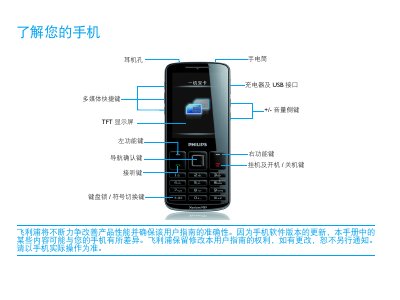
This manual explains the basic operation of the Philips Xenium 9@9 series phone, including key functions, navigation, and how to use the touchscreen and shortcut menus. It also provides detailed instructions for installing the SIM card, inserting a Micro‑SD card, and charging the device safely.
Additional sections cover personalization settings such as scene modes, ringtone and volume adjustments, as well as tips for extending battery life by managing dual‑SIM usage, disabling unused radios, and using original Philips accessories. This manual is written in Chinese.
| SAR limit | 4737 W |
|---|---|
| Dual‑SIM support | Yes |
Yes, the phone can be used while it is charging.