
This is a Philips mobile phone user manual, which introduces the basic functions and usage methods of the phone.
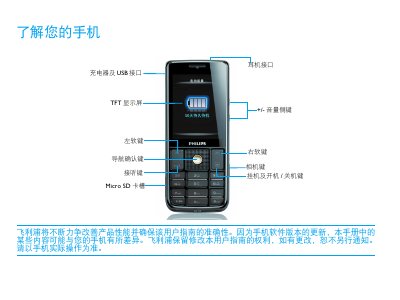
This guide introduces the basic layout of the Xenium 9@9 phone, describing the standby screen, key functions, and how to navigate menus, launch applications, and use the touch screen. It explains the purpose of each button, such as the lock/unlock key, power key, and shortcut widgets, and shows how to customize the home screen.
The manual also covers practical tasks like inserting the SIM cards, installing the battery, charging, and connecting to networks (GSM, EDGE, GPRS). Safety precautions, battery‑performance tips, and recommended settings (scene mode, disabling unused features, using original accessories) are provided to help users get the most out of their device. This manual is written in Chinese.
| External Storage | Micro SD card |
|---|