
Philips mobile phone user guide, introducing the functions of the phone's buttons, layout of the main screen, meanings of icons and symbols, as well as methods of using the phone, including installing SIM card, charging, making and receiving calls, and sending and receiving messages.
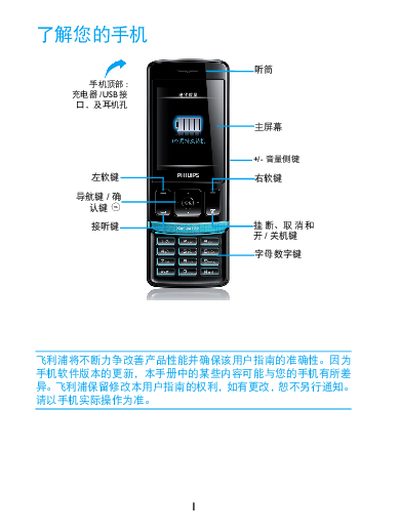
This guide introduces the Xenium X223 mobile phone, describing its hardware layout, key functions, and how to install the SIM card, battery, and Micro SD card. It also explains charging procedures and how to use the device while it is connected to power.
The manual covers making and receiving calls, sending SMS and MMS messages, using different input methods, and understanding on‑screen icons such as network status, Bluetooth, and battery level. A troubleshooting section provides steps for common issues like power problems, network errors, and battery care. This manual is written in Chinese.
| Network Type | GSM |
|---|---|
| Data Network | GPRS |
| Bluetooth | Supported |
| Micro SD Card | Supported |
Long‑press the * key to enter the international prefix “+” before dialing the number.
Yes, the phone can be used while it is connected to a charger.
Charge the battery until the battery icon stops flashing, then try turning the phone on again.