
This document introduces the features and performance of Philips mobile phones, including operations such as screen unlocking, making calls, and viewing messages. Philips phones support GSM/GPRS/EDGE networks and are equipped with a 3.2MP camera lens and multimedia functions. Users can choose functions through quick icons or the main menu, and can quickly access the multimedia function screen using the multimedia button.
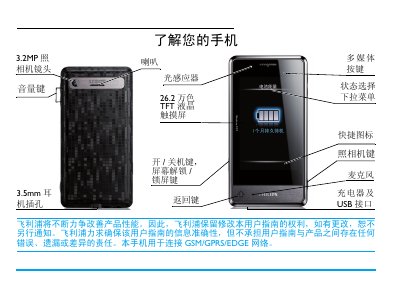
This manual introduces the Philips Xenium 9@9 mobile phone, covering hardware features such as the 26.2‑wan‑color TFT touch screen, 3.2 MP camera, and 3.5 mm headset jack. It guides users through first‑time setup, SIM and micro‑SD insertion, and how to navigate the main menu and quick‑access icons.
Detailed sections describe making and receiving calls, sending messages, using multimedia functions, adjusting screen brightness, enabling power‑saving modes, and calibrating the included stylus. The final pages provide warranty information, environmental statements, and battery‑optimization recommendations. This manual is written in Chinese.
| Screen | 26.2万色 TFT LCD touch screen |
|---|---|
| Camera | 3.2 MP rear camera |
| Headphone jack | 3.5 mm |
Press and hold the power key on the left side of the phone.
Set the brightness to medium or low and choose a short backlight duration in the display settings.
During a call, tap the options list and select the speaker mode to turn it on or off.