
This manual provides operating instructions, setup guides, and battery optimization tips for the Philips Xenium 9@9 mobile phone.
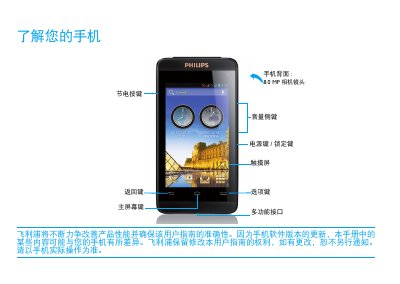
This document is the user manual for the Philips Xenium 9@9 mobile phone. It covers basic operations such as turning the device on and off, using the touchscreen, and navigating the main menu and status icons. The guide explains how to install the SIM card and charge the battery for the first time. This manual is written in Chinese.
Press and hold the power key to turn the phone on. To turn it off, press and hold the power key until the menu appears and select 'Power off'.
Press the power key briefly to lock the screen. To unlock, drag the slider from the top of the screen to the bottom.
If the battery is completely empty, wait a few minutes (usually no more than 5 minutes) before the charging icon appears on the screen.