
This document introduces the features and performance of Philips mobile phones, explains the accuracy of the user guide and possible changes. It includes the use of standby screen, main key operations, handwriting pen, and desktop widget.
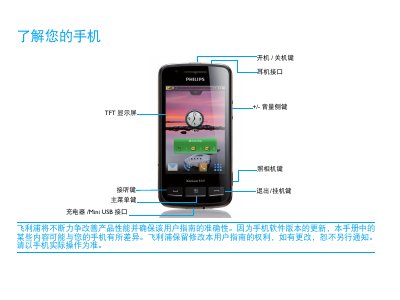
This manual introduces the Philips Xenium 9@9 series phone, describing the layout of the standby screen, key functions, and how to navigate the interface using the touch screen or stylus. It covers essential tasks such as inserting SIM cards, installing a Micro SD card, and using widgets for quick access.
Further sections explain charging procedures, battery‑care recommendations, Bluetooth/Wi‑Fi/GPS usage, and data synchronization with a computer via the Mobile Phone Tools software. Safety notes and regulatory information are also provided. This manual is written in Chinese.
| Battery status on first use | Partially charged |
|---|---|
| Micro SD card support | Supported for storage expansion |
Connect the charger to the phone; once fully charged, you may keep it connected without damaging the battery, but it is recommended to unplug it after charging.