
Philips mobile phone user guide, introduces the operation of mobile phone power on, power off, call, answer call, check text messages, check call records, etc
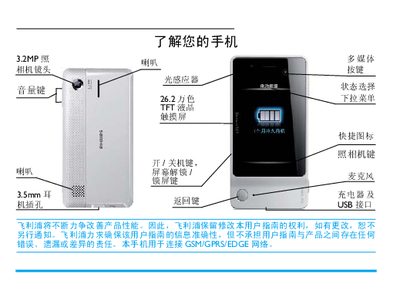
This manual explains how to start up the Philips Xenium 9@9 phone, insert SIM and micro‑SD cards, charge the battery, and set the clock. It also describes the various input methods, including the full keyboard, alphanumeric keyboard, and the optional handwriting pen.
The guide details phone functions such as making and receiving calls, using multimedia features, managing contacts, sending messages, and configuring settings like GPRS, Bluetooth, and power‑saving modes. Warranty and service information are provided at the end of the document. This manual is written in Chinese.
| Earphone jack | 3.5 mm |
|---|---|
| Handwriting pen | Included |
Long‑press the power button on the left side of the phone.
Short‑press the lock key on the left side to lock, and short‑press the unlock key or slide the lock bar to unlock.