
Philips Xenium 9@9 Series User Manual

This manual provides operating instructions for the Philips Xenium 9@9 mobile phone, covering setup, usage, and battery optimization.
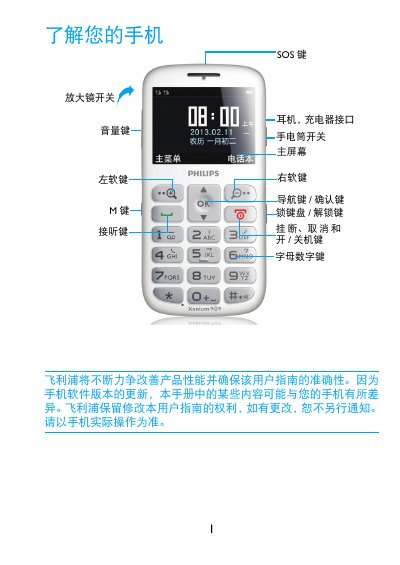

Philips Xenium 9@9 Series User Manual - cover page
Brand
Philips
Category
Mobilephone Accessories
Document type
User Manual
Language
Chinese
Pages
19
File format
PDF
File size
2.2 MB
Published
17 October, 2026
Updated
17 October, 2026
MD5 checksum
BA2A06EABF8C51E3E5174D7EE511BE19

About this manual

This user guide explains how to use the Philips Xenium 9@9 mobile phone. It covers basic operations such as making calls, sending messages, and managing contacts. The manual also details how to install the SIM card and battery, and how to use the camera and text input features. This manual is written in Chinese.

What's inside

  • Understanding Your Phone
  • Standby Screen
  • Installation and Charging
  • Making Calls
  • Sending Messages
  • Text Input
  • Phonebook Management
  • Camera
  • Battery Optimization

Frequently asked questions

How do I turn on the flashlight?

Slide the flashlight switch up to turn it on and down to turn it off.

How do I insert a Micro SD card?

Open the card slot cover, align the Micro SD card with the slot, and insert it.

How do I make an international call?

Press and hold the call key to input the international prefix "+", then enter the number.

Download PDF (2.2 MB)

More Philips Manuals


View all Philips manuals →