
Philips mobile phone user manual, introduces the phone's power on, power off, dialing, answering calls, viewing text messages and other common functions.
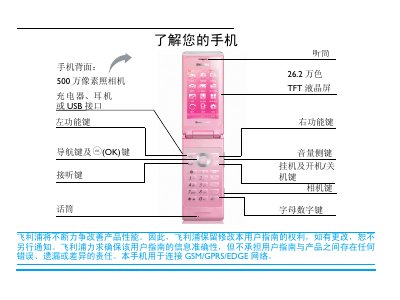
This manual explains how to operate the Philips Xenium 9@9 mobile phone, covering basic functions such as powering on/off, dialing, receiving calls, adjusting volume, and using the keypad. It also describes navigation through menus, setting shortcuts, and customizing the external display and lighting effects.
Additional sections cover SIM card insertion, battery charging, clock setup, multimedia features like the 5‑MP camera and music player, Bluetooth pairing, and detailed troubleshooting and warranty information. Battery‑saving tips and recommended settings for different usage scenarios are also provided. This manual is written in Chinese.
| Camera resolution | 5 MP |
|---|---|
| Display | 262,000 colors TFT LCD |
| Network | GSM/GPRS/EDGE |
Press and hold the power key ( ) to turn the phone on or off.
Enter the telephone number using the numeric keypad and press ( to dial.
On the standby screen, long‑press the # key to toggle silent mode.