
Philips mobile phone user manual, introducing the basic functions and operating methods of the mobile phone
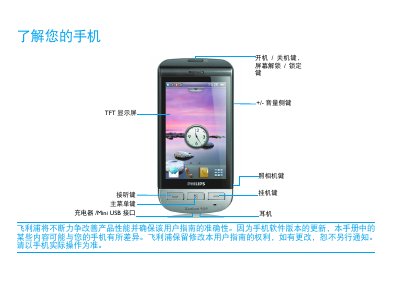
This guide introduces the basic operation of the Philips Xenium 9@9 phone, covering the layout of the standby screen, key functions such as power, lock, dialing, and navigation through menus and widgets. It explains how to use the touchscreen with a stylus or finger, manage shortcuts, and access common applications like the browser, music player, and messaging.
The manual also details installation steps, including SIM‑card and battery insertion, charging procedures, and safety precautions. It offers tips for extending battery life, such as selecting appropriate scenario modes, disabling unused features (Bluetooth, Wi‑Fi, GPS), and using original Philips accessories. Network indicators, calibration instructions, and regulatory information are also provided. This manual is written in Chinese.
Remove the battery cover, insert SIM1 or SIM2 into the slot, then reinstall the battery.