
This manual introduces the basic functions and usage methods of Philips mobile phones.
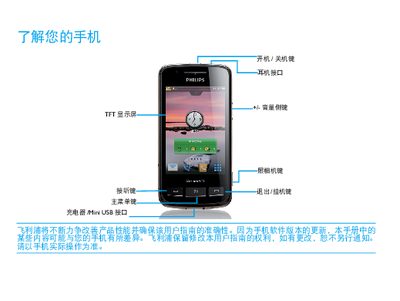
This manual introduces the Philips Xenium 9@9 phone, describing the layout of the standby screen, key functions, and how to navigate the interface. It covers basic operations such as making calls, using widgets, and managing applications.
The guide also explains hardware setup, including SIM card insertion, Micro SD card installation, charging procedures, and tips for extending battery life. Safety information, network indicators, and connectivity options (Bluetooth, Wi‑Fi, GPS) are detailed, along with instructions for syncing data with a PC. This manual is written in Chinese.
| SAR value | 4.312 W/kg |
|---|---|
| Micro SD card support | Expandable storage via Micro SD card |
Turn off the phone, remove the battery cover, insert the SIM card as shown, then replace the battery cover.
Connect the charger to the phone; once fully charged you may keep it connected without damage, but unplug it when not needed.
Use appropriate profile modes, disable unused features like Bluetooth, Wi‑Fi, GPS, and close background apps; also keep the phone in a moderate temperature environment.