
This document introduces the features and characteristics of Philips mobile phones, including the operation of the phone's keys, the icons and symbols displayed on the screen, and the steps for installing SIM cards and charging.
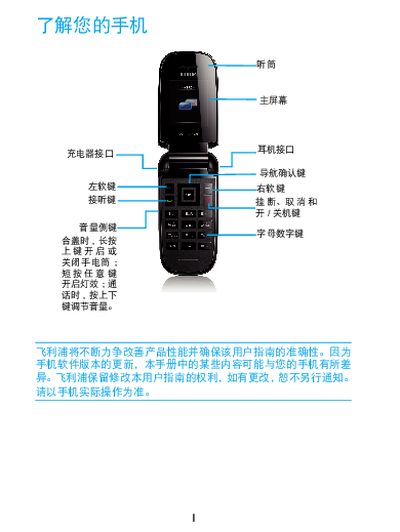
The Philips Xenium X26 phone manual explains how to install and configure the SIM card, set up the micro‑SD card, and use basic phone functions. It includes safety information and regulatory notices.
Key sections cover SIM card insertion (e.g., "45 SIMI REL Bo"), micro‑SD card handling (e.g., "HHA Micro SD + ( THE )"), and GSM network settings, helping users get the device operational quickly. This manual is written in Chinese.
Insert the SIM card as described in the manual section that mentions "45 SIMI REL Bo".
Place the micro‑SD card according to the instructions shown in the section referencing "HHA Micro SD + ( THE )".