
This document provides instructions and operation guides for Philips mobile phones, including inserting SIM cards, charging, power on/off, making calls, accessing phonebook, etc. Philips mobile phones are primarily used for connecting to GSM/GPRS networks.
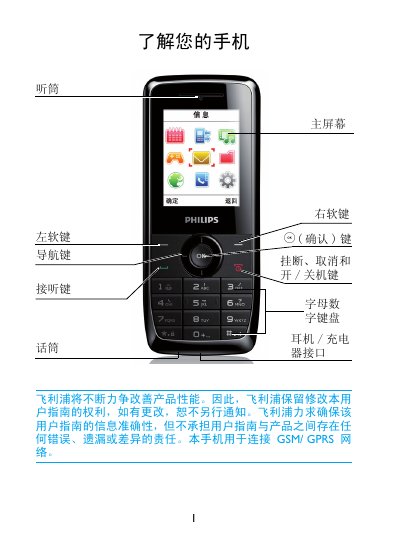
This manual explains how to set up and use the Philips Xenium 9@9 mobile phone. It includes instructions for inserting the SIM card, charging the battery, navigating menus, configuring settings, and using features such as calls, messaging, web browsing, and multimedia.
Additional sections cover phone customization, dual‑SIM management, voice mail, radio, and warranty information, as well as environmental and battery‑optimization tips for extending device life. This manual is written in Chinese.
| Network | GSM / GPRS |
|---|---|
| SIM support | Dual SIM (SIM1 / SIM2) |
Remove the back cover, take out the battery, insert the SIM card with the gold contacts facing down, then replace the battery and cover.
Connect the charging connector to the phone and plug the other end into a power outlet.
Select L菜单 > 设置 > 显示设置 > 墙纸 and choose an image from the Micro SD card.
The battery is covered by a six‑month warranty.