
This manual provides instructions for setting up, using, and maintaining the Philips Xenium 9@9 mobile phone, including SIM card installation, charging, and…
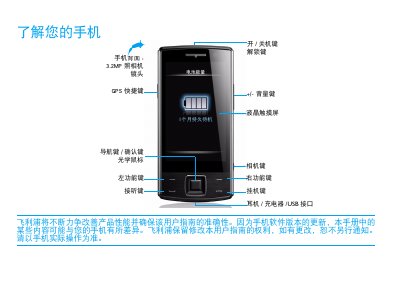
This document is the user manual for the Philips Xenium 9@9 mobile phone. It covers essential setup procedures such as installing the SIM card and Micro SD card, charging the battery, and synchronizing data with a computer. The guide also details how to use the phone's various features, including the camera, GPS navigation, music player, and radio. This manual is written in Chinese.
| Camera Resolution | 3.2MP |
|---|---|
| Model Number | Xenium X713 |
| SAR Value | 4.501 W/kg |
Wait a few minutes, usually not exceeding 5 minutes, for the charging icon to appear on the screen.
Set the appropriate profile mode, close unused applications like Bluetooth or GPS, and avoid placing the phone near magnetic objects or metal surfaces.