
Philips mobile phone user manual, introduces the meaning of each function key, icon and symbol of the mobile phone, as well as how to use the mobile phone to make phone calls, send text messages, receive MMS, set the mobile phone, etc.
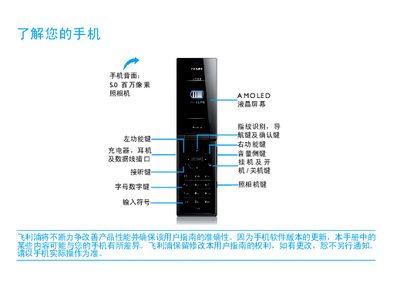
This manual introduces the Philips Xenium 9@9 series mobile phone, covering first‑time setup, SIM insertion, battery charging, and Micro SD card installation. It explains how to personalize settings, use basic functions such as calls and messaging, and access multimedia features like the camera, music player, and Bluetooth.
Safety warnings, battery‑care tips, and troubleshooting steps are included to help users maintain reliable performance and avoid damage. The guide also details regulatory compliance and environmental information for the device. This manual is written in Chinese.
| Camera resolution | 5.0 megapixels |
|---|---|
| Display type | AMOLED LCD |
| Supported network frequencies | GSM 900/1800/1900 MHz |
| Micro SD card slot | Supported |
Turn off the phone, remove the battery cover, take out the battery, then insert the SIM card before re‑installing the battery and cover.
Yes, the phone can be used while charging, but you should disconnect the charger once the battery is fully charged.
Open the Settings menu, go to General > Dynamic Desktop Settings, and turn on the Bluetooth icon; the status will show "Bluetooth 已开启".
Turn off the phone or disable its wireless functions before the flight, as using the phone can interfere with aircraft operation and violate regulations.