
Philips mobile phone user guide, introduces the functions of the phone's buttons, touch screen calibration, shortcut menu, etc., and explains the meaning of various icons and symbols.
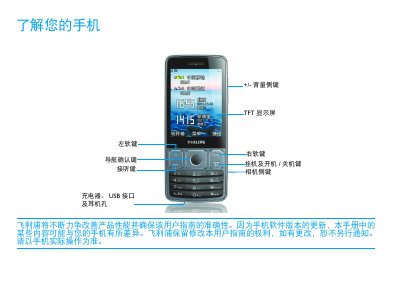
This manual introduces the Philips Xenium 9@9 mobile phone, describing the main keys, display icons, and network status indicators such as GSM, GPRS and EDGE connections. It guides users through basic operations like making calls, adjusting settings, and using built‑in applications.
Detailed sections cover installing the SIM and Micro‑SD cards, charging the device, syncing data with a computer via Mobile Phone Tools, personalizing settings, and tips for extending battery life. Safety notices, RoHS compliance and regulatory information are also included. This manual is written in Chinese.
| Network support | GSM |
|---|---|
| Network support | GPRS |
| Network support | EDGE |
| SIM capability | Dual SIM dual standby |
| Regulatory compliance | EU RoHS |
Connect the charger to a power outlet, plug the charger’s connector into the phone’s charging port, and the battery icon will indicate charging.