
Key facts
Start here
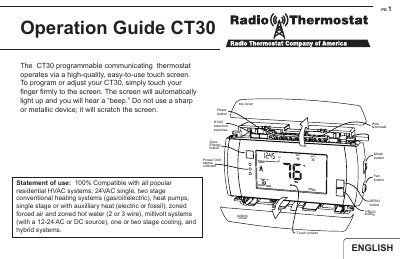
Philips CT30 Programmable Communicating Thermostat Operation Guide
This document provides operating instructions for the Philips CT30 programmable communicating thermostat. It explains how to use the high-quality touch screen to navigate between the HOME, MENU, PROGRAM, and MANUAL control screens. The guide details how to set the mode (HEAT, OFF, COOL), adjust time and temperature, and configure settings for various residential HVAC systems.
Read onlinePhilips CT30 specifications
| Power Source | 3AA alkaline batteries and/or 24 volt AC C wire |
|---|---|
| External Power Range | 12V to 24V AC or DC |
| Max Relay Load | 1.0 amp |
| Wire Gauge | 16-22awg |
| Mounting Height | about 5 ft. (1.5m) above the floor |
All Philips CT30 documents by type
Mounting, wiring and first power-up. Read it before the hardware goes in.
Day-to-day operation, settings and troubleshooting. Start here if the product is already set up.
Ratings, dimensions and ordering codes, for selection and design work.
Questions answered in these manuals
What is the recommended mounting height for the CT30?
Mount the thermostat on an inside wall about 5 ft. (1.5m) above the floor.
Can the CT30 be powered by external voltage?
Yes, it can be externally powered with a source rated from 12V to 24V, AC or DC.
How do I access the manual override screen?
Touch the large current temperature display in the middle of the HOME screen, provided the mode is set to HEAT or COOL.
From: Philips CT30 Programmable Communicating Thermostat Operation Guide
What does the EMER function do?
It disables the heat pump and activates auxiliary heat as the sole source of heat for heat pump systems.
From: Philips CT30 Programmable Communicating Thermostat Operation Guide
What is the logic function of the 74HC/HCT30?
The 74HC/HCT30 provides the 8-input NAND function.
What logic function does the 74HC/HCT30 perform?
The device provides an 8-input NAND function.