
Key facts
- Brand
- Philips
- Model
- D812
- Category
- Cell Phones
- Documents
- 2
- Languages
- ZH
- Last added
- 2012-03-27
Start here
Philips D812 User Manual
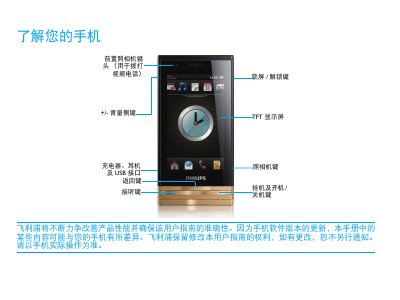
This manual introduces the Philips D812 mobile phone, describing its main keys, standby screen, widgets, and quick‑icon functions. It explains how to make calls, send messages, use the camera, and access various applications.
The guide also covers installation of the UIM/SIM card, battery charging, Micro‑SD card handling, safety precautions, and troubleshooting steps for common issues such as power‑on problems, battery life, and network connectivity. This manual is written in Chinese.
Philips D812 specifications
| Screen resolution | 240 × 400 pixels |
|---|---|
| Camera | 3.2 MP auto‑focus |
| Network modes | CDMA2000 EVDO, GSM 900/1800 MHz |
| Memory card | Micro SD up to 8 GB |
| Battery standby time | 100 hours |
| Talk time | 190 minutes |
| Weight | 125 g |
| Dimensions | 109.6 × 55.2 × 13.95 mm |
Source: Philips CTD812BLK User Manual
All Philips D812 documents by type
Day-to-day operation, settings and troubleshooting. Start here if the product is already set up.
Questions answered in these manuals
How do I insert the UIM/SIM card?
Remove the battery cover, insert the UIM/SIM card, then replace the battery cover.
From: Philips D812 User Manual
Can I use the phone while it is charging?
Yes, the phone can be used during charging; the battery icon will show the charge status.
From: Philips D812 User Manual
What network modes does the CTD812 support?
It supports dual‑mode EVDO and GSM, with CDMA2000 EVDO and GSM 900/1800 MHz bands.
What type of memory card can be used and what is the maximum capacity?
The phone uses Micro Secure Digital (Micro SD) cards up to 8 GB.