
Key facts
- Brand
- Philips
- Model
- T910
- Category
- Cell Phones
- Documents
- 3
- Languages
- ZH · EN
- Last added
- 2012-03-27
Start here
Philips T910 Phone User Manual
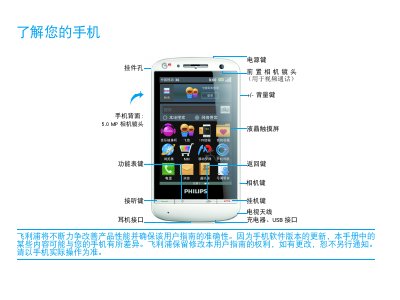
This manual introduces the Philips T910 mobile phone, describing its hardware buttons, camera (5.0 MP), and default standby screens. It explains how to navigate the lock screen, use shortcut menus, and customize the home screen with apps, wallpapers, and widgets.
The guide also covers installation steps such as inserting a Micro‑SD card, charging the battery, and connecting to a computer. Safety information, compliance with EN 60950, SAR limits, and troubleshooting tips for network, battery, and display issues are provided toward the end of the document. This manual is written in Chinese.
Philips T910 specifications
| Camera resolution | 5.0 MP |
|---|---|
| SAR value | 0.412 W/kg |
| Safety standard | EN 60950 |
Source: Philips T910 Phone User Manual
All Philips T910 documents by type
Day-to-day operation, settings and troubleshooting. Start here if the product is already set up.
Questions answered in these manuals
How do I charge the phone if the battery is completely dead?
Wait a few minutes (usually not more than 5 minutes) before the charging icon appears on the screen.
What should I do if the phone will not turn on?
Remove the battery, reinstall it, then charge the phone until the battery indicator stops flashing before trying to power on again.
How do I install the battery?
Open the battery compartment, insert the AA battery with correct polarity, then close the cover and turn the indicator to the ‘on’ position.
How should I clean the trimmer after use?
Rinse the cutting element under running hot water, optionally use the supplied brush for the NT9110 model, then dry the unit before storing.
What is the screen size of the Philips CTT910WHT?
The phone features a 3.5‑inch HVGA TFT touch screen.
What type of battery does the CTT910WHT use?
It uses a 1530 mAh lithium‑ion battery.