
Key facts
- Brand
- Philips
- Model
- WA20
- Category
- Cell Phones
- Documents
- 2
- Languages
- ZH
- Last added
- 2012-04-01
Start here
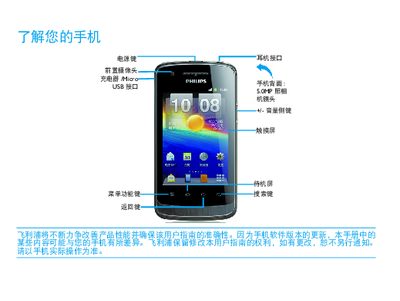
Philips WA20 Mobile Phone User Manual
This manual introduces the Philips WA20 mobile phone, describing its hardware layout, standby screen functions, and how to use quick icons and basic operations such as calling, messaging, and navigating the interface.
It also provides instructions for installing the USIM/SIM card, charging the device, managing battery life, and troubleshooting common issues like network connectivity, Bluetooth, and Wi‑Fi. This manual is written in Chinese.
Philips WA20 specifications
| Camera resolution | 50 MP |
|---|---|
| Wi‑Fi | Supported, connected |
| Bluetooth | Supported, enabled |
| Battery indicator | Shows charge level |
| SIM card type | USIM / SIM |
All Philips WA20 documents by type
Day-to-day operation, settings and troubleshooting. Start here if the product is already set up.
Questions answered in these manuals
How do I turn the phone on or off?
Short‑press the power key to turn the screen power on or off; long‑press opens the options menu.
How do I insert the SIM/USIM card?
Turn off the phone, remove the battery cover, insert the USIM (or SIM) card, then replace the cover and battery.
How do I insert the USIM/SIM card?
Turn off the phone, remove the battery cover, take out the battery, then insert the USIM or SIM card as shown, and replace the battery cover.
How can I extend the phone’s battery life?
Reduce screen brightness, disable unnecessary wireless functions, and follow the tips in the “How to extend battery usage time” section.