
Key facts
- Brand
- Philips
- Model
- F610
- Category
- Cell Phones
- Documents
- 2
- Languages
- ZH
- Last added
- 2012-03-27
Start here
Philips F610 Mobile Phone User Manual
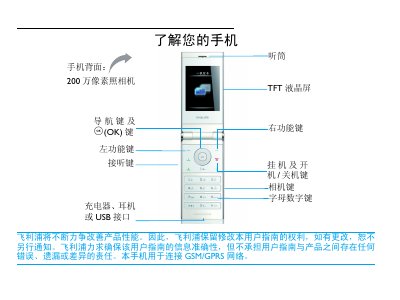
This user manual explains how to operate the Philips F610 mobile phone. It describes the layout of the device, the function of navigation and OK keys, and provides step‑by‑step instructions for making calls, sending messages, using the camera, browsing the web, and accessing multimedia features.
The guide also covers essential setup tasks such as inserting SIM cards, charging the battery, inserting a Micro‑SD card, configuring the clock, and adjusting settings like shortcuts and power‑saving mode. Safety notices, warranty information, and regulatory compliance details are included at the end of the document. This manual is written in Chinese.
All Philips F610 documents by type
Day-to-day operation, settings and troubleshooting. Start here if the product is already set up.
Questions answered in these manuals
How do I make a call on the Philips F610?
Enter the phone number using the numeric keypad and press the (or $) key to dial.
Can I charge the phone while using it?
Yes, the phone can be used while the charger is connected; disconnect the charger after the battery is fully charged to avoid over‑charging.
Which Philips products are compatible with the VIA cup?
The VIA cup is compatible with all Philips Avent breast pumps and nipples.