
Key facts
- Brand
- Philips
- Model
- SA9344
- Category
- MP3 Player
- Industry
- Electronics
- Documents
- 3
- Languages
- EN · ZH
- Last added
- 2012-03-27
Start here
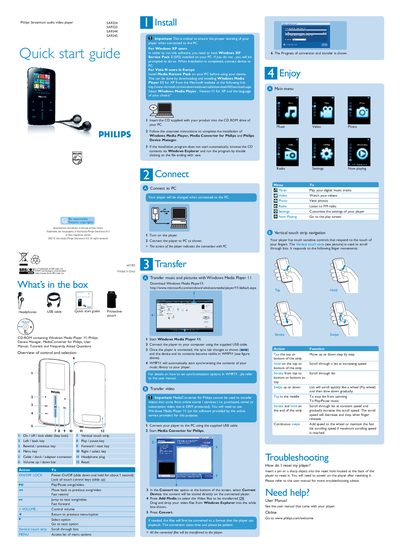
Philips Streamium SA9324/SA9325/SA9344/SA9345 Quick Start Guide
The guide lists the items included in the box (USB cable, CD-ROM with software, headphones) and walks you through installing the Media Converter, Philips Device Manager and Windows Media Player 11 on a PC. It explains how to connect the player via USB, transfer music, photos and videos, and use the touch‑sensitive controls for navigation.
It also describes the vertical touch strip gestures, menu layout, and provides troubleshooting tips such as resetting the player by inserting a pin into the reset hole. Links to the full user manual and online support are included.
Philips SA9344 specifications
| Operating temperature | 0 °C to 35 °C |
|---|---|
| Storage temperature | -20 °C to 45 °C |
| Battery type | Li‑ion |
| Supported audio formats | MP3, WMA |
| Supported video format | WMV |
Source: Philips Streamium SA9324 SA9325 SA9344 SA9345 User Manual
All Philips SA9344 documents by type
Day-to-day operation, settings and troubleshooting. Start here if the product is already set up.
The shortest path to a working setup, usually only a few pages.
Questions answered in these manuals
How do I reset the player?
Insert a pin or a sharp object into the reset hole at the back of the player, then power it on.
From: Philips Streamium SA9324/SA9325/SA9344/SA9345 Quick Start Guide
What software is required to transfer media to the player?
Use the Media Converter for Philips together with Windows Media Player 11.
From: Philips Streamium SA9324/SA9325/SA9344/SA9345 Quick Start Guide
What is the operating temperature range for this music player?
The player should be operated at temperatures between 0 and 35 degrees Celsius (32 to 95 degrees Fahrenheit).
From: Philips SA9324 SA9325 SA9344 SA9345 Music Player User Manual
What is the storage temperature range for this music player?
The player should be stored at temperatures between -20 and 45 degrees Celsius (-4 to 113 degrees Fahrenheit).
From: Philips SA9324 SA9325 SA9344 SA9345 Music Player User Manual
How do I connect the player to a computer?
Use the supplied USB cable to connect the player to a PC.
From: Philips Streamium SA9324 SA9325 SA9344 SA9345 User Manual
What are the operating temperature limits for the player?
The player can be operated between 0 °C and 35 °C.
From: Philips Streamium SA9324 SA9325 SA9344 SA9345 User Manual