
Key facts
- Brand
- Agilent
- Model
- G5404B Microplate Labeler
- Industry
- Industrial
- Documents
- 3
- Languages
- EN
- Last added
- 2012-07-04
Start here
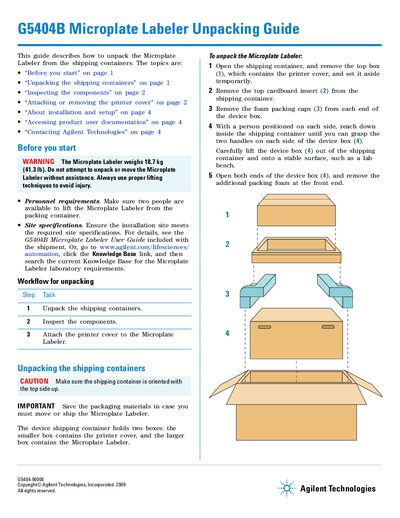
Agilent G5404B Microplate Labeler Unpacking Guide
This document serves as an Unpacking Guide for the Agilent G5404B Microplate Labeler. It details the workflow for safely removing the device from its shipping containers, including specific steps for handling the heavy unit with assistance and extracting the main device box from the tray.
The guide also covers inspecting the included components against a checklist (such as media kits, cables, and power cords) and provides detailed procedures for attaching or removing the printer cover to protect the printhead. It directs users to the separate User Guide for installation and setup instructions.
Agilent G5404B Microplate Labeler specifications
| Printer Resolution | 600 dpi |
|---|---|
| Label Dimensions (Standard) | 50.8 mm W x 6.35 mm H |
| Temperature Range | -80°C to 100°C |
| Label Application Precision (Horizontal) | +/- 1.0 mm |
| Total Time Per Plate | 20 sec |
| Label Capacity (Roll) | 6,500 or 13,000 labels |
Source: Agilent BenchCel Automated Barcode Labeling Workstation Data Sheet
All Agilent G5404B Microplate Labeler documents by type
Ratings, dimensions and ordering codes, for selection and design work.
Day-to-day operation, settings and troubleshooting. Start here if the product is already set up.
Questions answered in these manuals
What is the total time per plate for labeling?
The typical total time per plate is 20 seconds.
From: Agilent BenchCel Automated Barcode Labeling Workstation Data Sheet
Can the system verify barcode labels?
Yes, with an optional barcode reader, the Microplate Labeler can verify and re-apply barcode labels.
From: Agilent BenchCel Automated Barcode Labeling Workstation Data Sheet
How many people are required to unpack the Microplate Labeler?
Two people are available to lift the Microplate Labeler from the packing container.
What should be done with the packaging materials after unpacking?
The packaging materials must be saved in case you must move or ship the Microplate Labeler again.