
Key facts
- Brand
- Philips
- Model
- SA4428
- Category
- MP3 Player
- Industry
- Electronics
- Documents
- 2
- Languages
- ZH
- Last added
- 2012-03-27
Start here
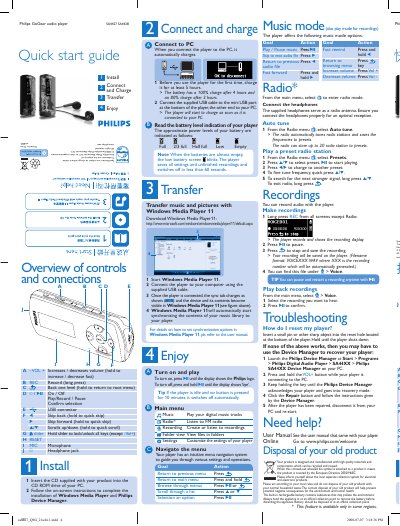
Philips SA4427 SA4428 Music Player Quick Start Guide
The guide explains how to install the supplied CD, install Windows Media Player and Philips Device Manager, and charge the player for the first use (at least 5 hours). It also details connecting the player to a PC via the mini‑USB cable for charging and file transfer.
It describes the button layout, navigation menu, playback controls, recording procedure, FM radio operation with up to 20 presets, troubleshooting steps such as resetting the device, and proper disposal of the rechargeable battery. This manual is written in Chinese.
Philips SA4428 specifications
| First‑use charging time | 5 hours minimum |
|---|---|
| Full charge time | 4 hours |
| 80 % charge time | 2 hours |
| Battery level indicators | Full, 2/3 full, Half full, Low, Empty |
Source: Philips SA4427 SA4428 Music Player Quick Start Guide
All Philips SA4428 documents by type
Day-to-day operation, settings and troubleshooting. Start here if the product is already set up.
The shortest path to a working setup, usually only a few pages.
Questions answered in these manuals
How do I reset the player?
Insert a small pin into the reset hole at the bottom of the player and hold until the player shuts down.
What happens if the player is idle for a long time?
If no button is pressed for 10 minutes, the player automatically switches off.
How do I register the product?
Visit the Philips registration website at www.philips.com/welcome and follow the on‑screen instructions.
How can I transfer music to the player?
Use Windows Media Player 11 to add music files to the library and then sync them to the player via the provided USB cable.