
Key facts
Start here
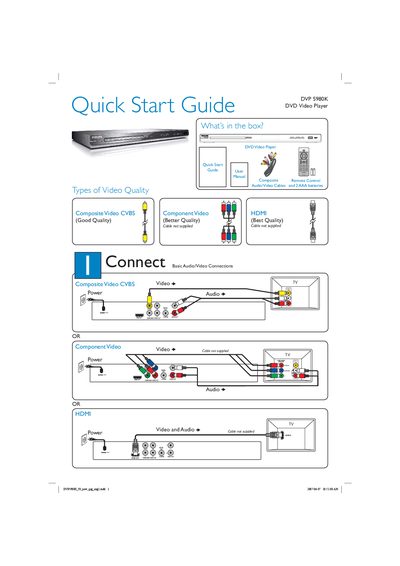
Philips DVP 5980K DVD Video Player Quick Start Guide
This guide provides an overview of the items included with the DVP 5980K DVD Video Player, basic audio/video connection options, and quick start instructions. It shows the box contents, explains composite, component and HDMI video quality options, and lists the required cables and remote control.
The guide walks you through powering on the unit, selecting the TV channel, choosing the menu language, and starting disc playback. It also includes troubleshooting tips for common issues such as no power, no picture, no sound, and remote‑control problems.
Philips DVP 5980K specifications
| Laser type | Semiconductor laser |
|---|---|
| DVD laser wavelength | 658 nm |
| DVD output power | 7.0 mW |
| CD output power | 10.0 mW |
| Beam divergence | 60 degrees |
All Philips DVP 5980K documents by type
The shortest path to a working setup, usually only a few pages.
Day-to-day operation, settings and troubleshooting. Start here if the product is already set up.
Questions answered in these manuals
How do I turn on the DVD player?
Press the STANDBY‑ON button on the top panel of the unit.
What should I do if there is no picture on the TV?
Check that the TV is set to the correct input and that all video cables are firmly connected.
How should I clean my discs?
Use a microfiber cleaning cloth and wipe the disc from the centre to the edge in a straight line; do not use solvents or cleaning CDs.
How can I connect the player to a TV via HDMI?
Connect an HDMI cable from the player’s HDMI port to the HDMI (or DVI) input on the TV, then select the appropriate HDMI input on the TV.