
Key facts
Start here
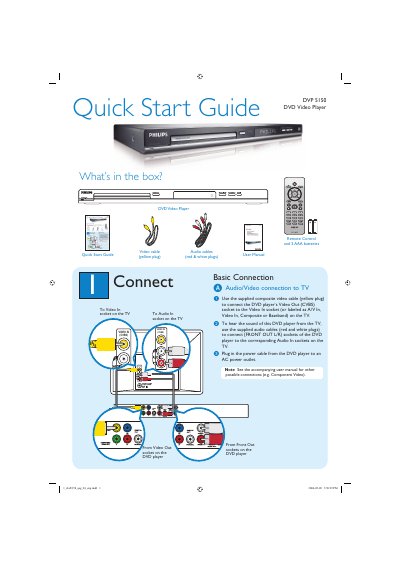
Philips DVP 5150 DVD Video Player Quick Start Guide
The guide lists the items included in the box—DVD player, remote control with two AAA batteries, a composite video cable, and audio cables—and explains how to connect the player to a TV using the supplied cables. It also covers powering the unit and points to the full user manual for additional connection options such as component video.
Setup instructions walk you through selecting the correct TV channel, configuring on‑screen language settings, and starting or stopping playback. A troubleshooting section provides quick checks for common issues like no power, no picture, no sound, or remote‑control problems.
Philips DVP 5150 specifications
| Laser type | Semiconductor laser GaAlAs |
|---|---|
| DVD laser wavelength | 650 nm |
| VCD/CD laser wavelength | 780 nm |
| DVD laser output power | 7 mW |
| VCD/CD laser output power | 10 mW |
| Beam divergence | 60 degrees |
| Model number | DVP5150 |
| Laser classification | Class 1 |
All Philips DVP 5150 documents by type
Day-to-day operation, settings and troubleshooting. Start here if the product is already set up.
The shortest path to a working setup, usually only a few pages.
Questions answered in these manuals
What safety precautions are required when servicing the DVD player?
Only a qualified service person should remove the cover or attempt to service the device because it employs a laser that can cause eye injury.
What should I do if there is no picture on the TV?
Check the connection to the TV and make sure the plugs are firmly in place.