
Key facts
- Brand
- Philips
- Model
- AS351
- Category
- Audio Power Amplifier
- Documents
- 2
- Languages
- EN
- Last added
- 2012-03-27
Start here
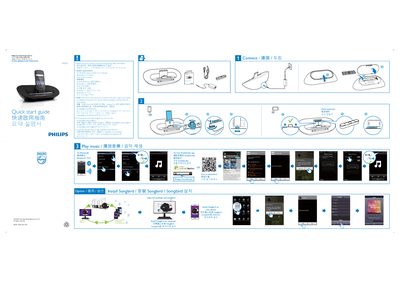
Philips AS351 Quick Start Guide
This quick start guide introduces the Philips AS351 Bluetooth audio device, covering essential safety information, battery handling, and basic installation steps. It also points users to the full manual and additional resources on the Philips website.
The guide lists system requirements for Android devices, Bluetooth version, and connectivity options such as micro‑USB and DockStudio app. Technical specifications include power output, signal‑to‑noise ratio, dimensions, weight, and power consumption details.
Philips AS351 specifications
| Rated Output Power | 2 × 5 W |
|---|---|
| Signal to Noise Ratio | 75 dBA |
| Input Voltage | 100‑240 V ~ 50/60 Hz, 800 mA max |
| Output Current | 3 A |
| Operation Power Consumption | < 35 W |
| Eco Standby Power Consumption | < 1 W |
| Maximum Charging Current | 2 A |
| Dimensions (W × H × D) | 270.5 × 88.5 × 141.5 mm |
| Weight | 0.885 kg |
| Bluetooth Version | 2.1 or above |
| Required Android Version | 2.1 or above |
Source: Philips AS351 Quick Start Guide
All Philips AS351 documents by type
The shortest path to a working setup, usually only a few pages.
Day-to-day operation, settings and troubleshooting. Start here if the product is already set up.
Questions answered in these manuals
How should I install the batteries safely?
Install the batteries with the correct polarity as marked (+ and –), do not mix different types, remove them if the device will not be used for a long time, and keep them away from excessive heat.
What are the system requirements for using the AS351 with an Android phone?
The device works with Android version 2.1 or later, requires Bluetooth 2.1 or higher, and uses a micro‑USB connector for charging and data transfer.
How do I charge my Android device with the speaker?
Connect the Android device to the speaker’s micro‑USB connector using a USB cable while the speaker is powered on.