
Key facts
- Brand
- Philips
- Model
- Xenium 9@9 series
- Category
- Cell Phones
- Documents
- 6
- Languages
- ZH
- Last added
- 2012-03-23
Start here
Philips Xenium 9@9 Series Phone User Manual
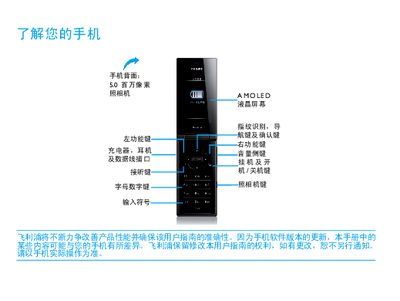
This manual guides users of the Philips Xenium 9@9 series smartphone through basic functions, hardware layout, and everyday usage. It covers the phone’s 5‑megapixel camera, AMOLED display, fingerprint sensor, and network capabilities such as GSM, GPRS and EDGE.
Key sections include installation and charging, SIM card insertion, micro‑SD card handling, PC synchronization, personalization settings, safety precautions, and battery‑optimization tips. Regulatory information such as SAR limits and RoHS compliance is also provided. This manual is written in Chinese.
Philips Xenium 9@9 series specifications
| Display | TFT |
|---|---|
| Camera | 3.2 MP |
| Network bands | GSM 900/1800/1900 MHz |
| SAR (Specific Absorption Rate) | 0.475 W/kg |
All Philips Xenium 9@9 series documents by type
Day-to-day operation, settings and troubleshooting. Start here if the product is already set up.
Questions answered in these manuals
How do I insert the SIM card?
Turn off the phone, remove the battery cover, then follow the illustrated steps to place the SIM card into its slot before reinstalling the battery and cover.
Can I use the phone while it is charging?
Yes, the phone can be used while charging, but you should disconnect the charger once the battery is fully charged to avoid damage.
How do I insert the SIM card?
Remove the back cover, take out the battery, insert the SIM card with the gold contacts facing down, then replace the battery and cover.
How can I charge the phone?
Connect the charging connector to the phone and plug the other end into a power outlet.
Can I charge the phone while using it?
Yes, the phone can be used while it is charging.
How do I insert the SIM card?
Turn off the phone, remove the battery cover, take out the battery, then insert the SIM card before re‑installing the battery and cover.