
This is a quick start guide for Philips GoGear audio player, which introduces installation, connection and charging, transfer and enjoyment
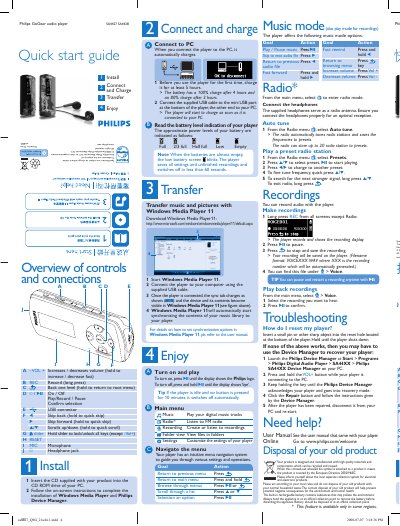
The guide explains how to install the supplied CD, install Windows Media Player and Philips Device Manager, and charge the player for the first use (at least 5 hours). It also details connecting the player to a PC via the mini‑USB cable for charging and file transfer.
It describes the button layout, navigation menu, playback controls, recording procedure, FM radio operation with up to 20 presets, troubleshooting steps such as resetting the device, and proper disposal of the rechargeable battery. This manual is written in Chinese.
| First‑use charging time | 5 hours minimum |
|---|---|
| Full charge time | 4 hours |
| 80 % charge time | 2 hours |
| Battery level indicators | Full, 2/3 full, Half full, Low, Empty |
Insert a small pin into the reset hole at the bottom of the player and hold until the player shuts down.
If no button is pressed for 10 minutes, the player automatically switches off.
The player can store up to 20 radio station presets.
Connect the supplied USB cable to the mini‑USB port on the player and the other end to the PC; the player will begin charging and appear in Windows Media Player for synchronization.