
Key facts
- Brand
- Philips
- Model
- PET723
- Category
- Video Player
- Industry
- Electronics
- Documents
- 4
- Languages
- EN · ZH
- Last added
- 2012-03-27
Start here
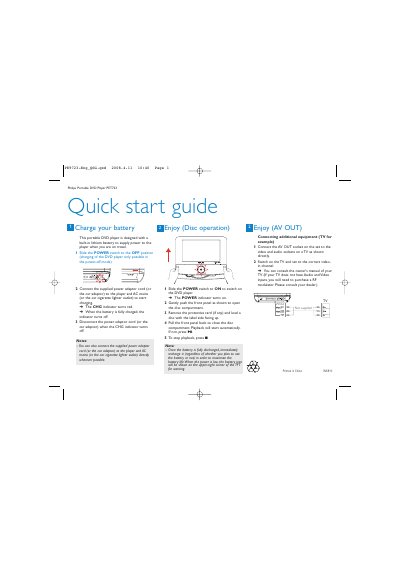
Philips PET723 Portable DVD Player Quick Start Guide
The Philips PET723 portable DVD player features a built‑in lithium battery that powers the device during travel. To charge, slide the POWER switch to OFF, connect the supplied AC or car adaptor, and watch the CHG indicator turn red until fully charged.
The guide explains how to turn the player on, open the disc compartment, load a disc, and start playback. It also shows how to stop playback, monitor battery level, and connect the AV OUT socket to a TV for audio‑video output.
Philips PET723 specifications
| Dimensions | 210 x 158 x 39.5 mm |
|---|---|
| Weight | 0.82 g |
| Power supply input | 100-240V 50/60Hz 0.3A |
| Power supply output | DC 9V 1A |
| Power consumption | 9W |
| Operating temperature range | 0 - 45 °C |
| Laser wavelength | 650 nm |
| Video system | PAL |
| Frequency response | 20 Hz ~ 20 kHz ± 1 dB |
| Signal‑to‑noise ratio | ≥ 80 dB |
| Audio distortion | ≤ ‑80 dB (1 kHz) |
| Channel separation | ≥ 80 dB |
| Dynamic range | ≥ 80 dB |
| Audio out level | 2 V ± 10 % |
| Audio load impedance | 10 kΩ |
| Video out level | 1 Vp‑p ± 20 % |
| Video load impedance | 75 Ω |
All Philips PET723 documents by type
Day-to-day operation, settings and troubleshooting. Start here if the product is already set up.
The shortest path to a working setup, usually only a few pages.
Questions answered in these manuals
How do I start playback after inserting a disc?
After loading the disc, the player will start automatically; if it does not, press the 2 button to begin playback.
How do I charge the battery?
Turn the player off and connect it to the AC mains adapter; the charge indicator will turn on.
What should I do if the player has no power?
Check that both plugs of the mains cord are properly connected, verify the outlet has power, and ensure the built‑in battery is not drained.