
Key facts
- Brand
- Philips
- Model
- PET722
- Category
- Video Player
- Industry
- Electronics
- Documents
- 2
- Languages
- EN
- Last added
- 2012-03-27
Start here
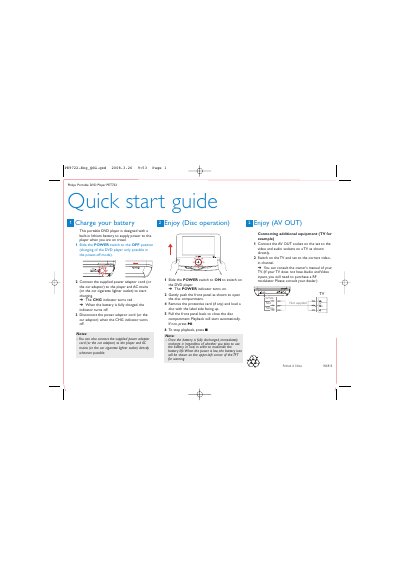
Philips PET722 Portable DVD Player User Guide
The Philips PET722 portable DVD player includes a built‑in lithium battery. To charge, slide the POWER switch to OFF, connect the supplied AC or car adaptor, and watch the CHG indicator turn red; it turns off when fully charged. Disconnect the adaptor once charging is complete.
For use, slide the POWER switch to ON, open the disc compartment, load a disc label‑side up, and close the compartment. Playback starts automatically, or press the play button. The device also offers AV OUT sockets for connecting to a TV, with video and audio signals transmitted to the TV’s corresponding inputs.
Philips PET722 specifications
| Dimensions | 210 x 158 x 39.5 mm |
|---|---|
| Weight | 0.79 kg / 0.36 pounds |
| Power supply (input) | 100‑240V 50/60Hz 0.3A |
| Power supply (output) | DC 9V 1A |
| Power consumption | 9W |
| Operating temperature range | 0 °C – 45 °C |
| Laser wavelength | 650 nm |
| Video system | PAL |
| Frequency response | 20 Hz ~ 20 kHz ± 1 dB |
| Signal‑to‑noise ratio | ≥ 80 dB |
| Audio distortion | ≤ ‑80 dB (1 kHz) |
| Channel separation | ≥ 80 dB |
| Dynamic range | ≥ 80 dB |
| Audio output level | 2 V ± 10 % (10 kΩ load) |
| Video output level | 1 Vp ± 20 % (75 Ω load) |
All Philips PET722 documents by type
Day-to-day operation, settings and troubleshooting. Start here if the product is already set up.
The shortest path to a working setup, usually only a few pages.
Questions answered in these manuals
How do I charge the built‑in rechargeable battery?
Connect the DVD player directly to the AC mains adapter; the charge indicator will turn on while the player is switched off.