
Key facts
- Brand
- Philips
- Model
- DVDR3588H
- Industry
- Electronics
- Documents
- 2
- Languages
- EN · JA
- Last added
- 2012-03-26
Start here
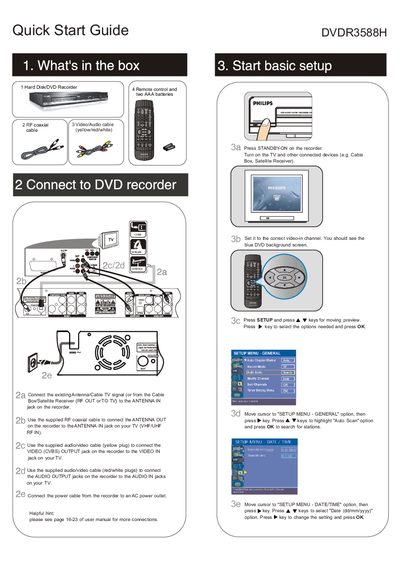
Philips DVDR3588H DVD Recorder Quick Start Guide
The guide begins with a list of items included in the box and shows how to connect the recorder to an antenna, TV, and audio/video equipment using the supplied cables. It then walks the user through the basic setup steps, including turning on the device, selecting the correct video input, and performing an auto‑scan for TV channels.
Further sections explain how to start recording manually, play back DVDs, select recording media, and adjust recording quality. The guide also provides tips for connecting audio and video signals and references the full user manual for more detailed information.
All Philips DVDR3588H documents by type
The shortest path to a working setup, usually only a few pages.
Day-to-day operation, settings and troubleshooting. Start here if the product is already set up.
Questions answered in these manuals
What disc types can be used with this DVD player?
The player supports DVD‑HR, DVD‑HRW and DVD+R/DL discs.
What is the maximum recording time per DVD?
A standard DVD‑HR disc can hold up to about 4.7 GB, which corresponds to roughly 2 hours of video at normal quality.