
Key facts
Start here
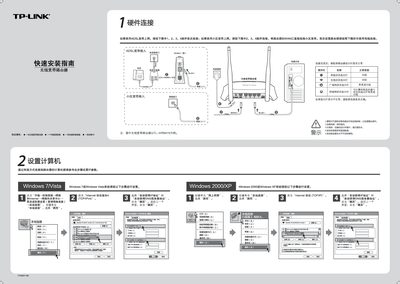
TP-Link TL-WR841N Wireless Router Quick Installation Guide
The document starts with hardware connection instructions, showing how to attach the ADSL or fiber line to the WAN port and verify the router’s indicator lights (system status flashing, WAN status steady or flashing).\n\nIt then walks through setting up a computer via wired Ethernet, configuring the router’s web interface (default IP 192.168.1.1, username/password admin), and establishing a wireless connection, followed by common troubleshooting steps such as checking indicator lights, WAN status, and wireless function. This manual is written in Chinese.
Read onlineTP-Link TL-WR841N specifications
| Default IP address | 192.168.1.1 |
|---|---|
| Default username | admin |
| Default password | admin |
| WAN status indicator | steady or flashing |
Source: TP-Link TL-WR841N Wireless Router Quick Installation Guide
All TP-Link TL-WR841N documents by type
Day-to-day operation, settings and troubleshooting. Start here if the product is already set up.
Mounting, wiring and first power-up. Read it before the hardware goes in.
The shortest path to a working setup, usually only a few pages.
Questions answered in these manuals
What should I do if I cannot access the router's management page at 192.168.1.1?
Check that the router is powered on, the Ethernet cable is correctly connected, and the corresponding LED indicators are lit. Then verify the WAN status in the router’s status page.
What should I do if I cannot access the router’s management page at 192.168.1.1?
Check that the router’s Ethernet cables are correctly connected and that the indicator lights are normal, then verify the WAN status on the router’s status page.
From: TP-Link TL-WR841N Wireless Router Quick Installation Guide
How do I reset the router if it won’t connect?
Restore the router to factory settings, then repeat the quick installation steps.
From: TP-Link TL-WR841N Wireless Router Quick Installation Guide
What does the QSS security setting do?
If the computer’s wireless card supports WPS, the QSS security setting lets you quickly and securely connect to the router’s wireless network.
From: TP-Link TL-WR841N 11N Wireless Broadband Router Detailed Configuration Guide
How can I view the router’s MAC address?
The MAC address is shown on the router’s status page in the format XX‑XX‑XX‑XX‑XX‑XX, where each X is a hexadecimal digit.
From: TP-Link TL-WR841N 11N Wireless Broadband Router Detailed Configuration Guide