
Key facts
Start here
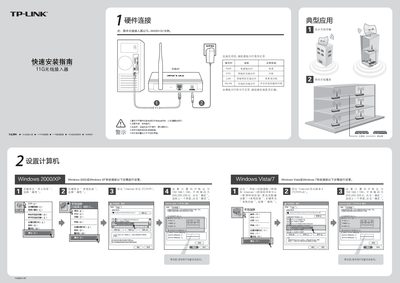
TP-Link TL-WA501G+ Quick Installation Guide
This guide provides step‑by‑step instructions for installing the TL‑WA501G+ wireless access point. It covers hardware connections, indicator LED status, and initial network configuration for Windows systems.
Additional sections explain POE adapter usage, available operating modes (Access Point, Client, Repeater, Bridge, etc.), and troubleshooting tips such as resetting the device and resolving wireless connection issues. This manual is written in Chinese.
TP-Link TL-WA501G specifications
| Wireless Signal Rates (11g) | 54/48/36/24/18/12/9/6 Mbps (dynamic) |
|---|---|
| Wireless Signal Rates (11b) | 11/5.5/2/1 Mbps (dynamic) |
| Frequency Band | 2.4‑2.4835 GHz |
| Wireless Transmit Power | 17 dBm (max) |
| Antenna | 3 dBi detachable omni‑directional |
| Modulation (802.11b) | DOPSK, DBPSK, DSSS, CCK |
| Modulation (802.11g) | BPSK, QPSK, 16QAM, 64QAM, OFDM |
| Receiver Sensitivity (6 Mbps) | -88 dBm @ 10 % PER |
| Power Supply | 9 VAC / 0.8 A linear PSU |
| Operating Temperature | 0 °C to 40 °C |
| Dimensions | 6.2 × 4.3 × 1.3 in. (158 × 110 × 32 mm) |
Source: TP-Link TL-WA501G User Manual
All TP-Link TL-WA501G documents by type
Day-to-day operation, settings and troubleshooting. Start here if the product is already set up.
The shortest path to a working setup, usually only a few pages.
Questions answered in these manuals
What operating modes does the TL-WA501G support?
It supports Access Point, Client, Universal/WDS Repeater, Point‑to‑Point, Point‑to‑Multi‑point, and Bridge modes.
What security encryption does the TL-WA501G provide?
It offers 64/128/152‑bit WEP, WPA/WPA2, WPA‑PSK/WPA2‑PSK, and TKIP/AES encryption.
What operating modes does the TL‑WA501G support?
It supports multiple operating modes including Access Point, Client, Universal/WDS Repeater, Point‑to‑Point, and Point‑to‑Multi‑point.
What type of antenna does the TL‑WA501G use?
The device comes with a 3 dBi detachable omni‑directional antenna.
What is the wireless range of the TL‑WA501G?
Indoor coverage up to 200 m and outdoor coverage up to 830 m.
How do I reset the AP hardware to factory defaults?
Power the device, press and hold the RESET button on the back for 5‑10 seconds, then release.