
Key facts
Start here
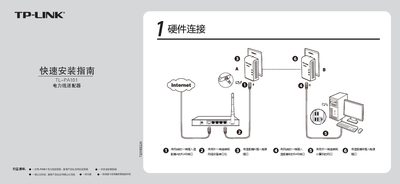
TP-Link TL-PA101 Powerline Adapter Quick Installation Guide
This guide shows how to connect the TL-PA101 adapters: plug each adapter into a wall outlet, connect one end of an Ethernet cable to the RJ45 port of Adapter A and the other end to your network device, then connect the second Ethernet cable from Adapter B to your computer. The kit includes two adapters, a CD, two Ethernet cables, a warranty card and a quick‑start guide.
The document explains the meaning of the indicator LEDs (system status, network connection, data transmission) and provides answers to common questions such as the need for a traditional modem, maximum transmission distance, interference from household appliances, and compatibility between TL-PA101 and TL-PA201 models. This manual is written in Chinese.
TP-Link TL-PA101 specifications
| Maximum data rate | 85 Mbps |
|---|---|
| Ethernet ports | 1 × 10/100 Mbps |
| Dimensions (L×W×H) | 3.6 × 2.8 × 1.7 in (92 × 70 × 44 mm) |
| Weight | 125 g |
| Operating temperature | 0 °C – 60 °C |
| Encryption | 56‑bit DES |
| Maximum range | 200 m (household power circuit) |
Source: TP-LINK 85Mbps Powerline Ethernet Adapter Starter Kit TL-PA101 User Guide
All TP-Link TL-PA101 documents by type
Day-to-day operation, settings and troubleshooting. Start here if the product is already set up.
The shortest path to a working setup, usually only a few pages.
Questions answered in these manuals
How many adapters are required to set up a powerline network?
At least two Powerline adapters are needed to establish a powerline network.
From: TP-LINK 85Mbps Powerline Ethernet Adapter Starter Kit TL-PA101 User Guide
What is the maximum range of the TL-PA101 within a house?
The TL-PA101 can operate up to 200 meters over the household power circuit.
From: TP-LINK 85Mbps Powerline Ethernet Adapter Starter Kit TL-PA101 User Guide
Do I need a traditional modem when using a powerline adapter?
Yes, the powerline adapter only creates a LAN inside the home; you still need a modem or router for internet access.
From: TP-Link TL-PA101 Powerline Adapter Quick Installation Guide
What is the maximum transmission distance of the TL-PA101?
The TL-PA101 can transmit data up to 200 meters.
From: TP-Link TL-PA101 Powerline Adapter Quick Installation Guide