
Key facts
Start here
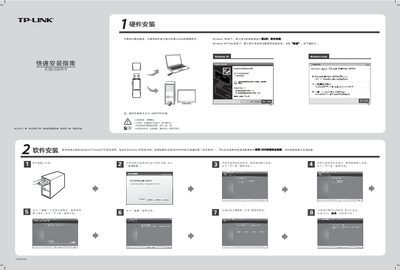
TP-Link TL-WN727N Wireless USB Network Card Quick Installation Guide
The guide provides step‑by‑step hardware installation instructions, showing how to insert the USB card into the correct slot without powering down the computer. It also includes a software installation walkthrough that works the same across Windows XP, Vista, and 7, with screenshots of the driver installer.
After the driver is installed, the document explains how to use the QSS (Quick Secure Setup) button on the card to automatically connect to a QSS‑enabled router or access point, including how to scan for networks, select an SSID, and enter a password if required. This manual is written in Chinese.
TP-Link TL-WN727N specifications
| Device Type | Network adapter |
|---|---|
| Form Factor | External |
| Interface (Bus) Type | Hi-Speed USB |
| Data Transfer Rate | 150 Mbps |
| Compliant Standards | IEEE 802.11b, IEEE 802.11g, IEEE 802.11n, IEEE 802.1x |
| Encryption Algorithms | AES, 128‑bit WEP, 64‑bit WEP, TKIP, WPA, WPA2, WPA‑PSK, WPA2‑PSK |
| Operating Temperature | 0 °C to 40 °C |
Source: TP-Link TL-WN727N Wireless Lite N USB Adapter User Manual
All TP-Link TL-WN727N documents by type
Disassembly, diagnostics and part numbers, for repair.
Day-to-day operation, settings and troubleshooting. Start here if the product is already set up.
The shortest path to a working setup, usually only a few pages.
Questions answered in these manuals
What is the maximum data transfer rate of the TL‑WN727N?
The adapter supports a data transfer rate of up to 150 Mbps.
From: TP-Link TL-WN727N Wireless Lite N USB Adapter User Manual
Which Windows operating systems are supported?
It works with Microsoft Windows 2000, Windows XP, and Windows Vista.
From: TP-Link TL-WN727N Wireless Lite N USB Adapter User Manual
How do I install the hardware for the TL-WN727N?
Insert the USB network card into the appropriate slot in the correct orientation; the computer does not need to be powered down.
From: TP-Link TL-WN727N Wireless USB Network Card Quick Installation Guide
What should I do if the network is encrypted?
The software will display the authentication and encryption type; simply click Continue and enter the network password when prompted.
From: TP-Link TL-WN727N Wireless USB Network Card Quick Installation Guide
How do I install the TL‑WN727N adapter?
Insert the adapter into a USB 2.0 port and run the installation wizard that appears automatically.
What is the maximum wireless speed of the TL‑WN727N?
The adapter supports a maximum data rate of up to 150 Mbps.