
Key facts
Start here
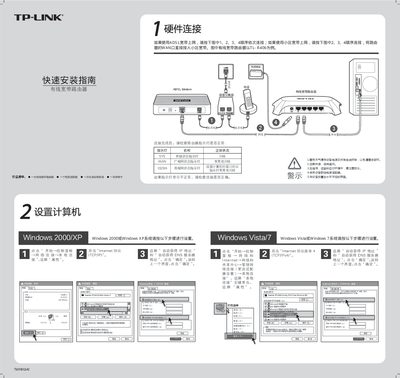
TP-Link TL-R406 Router Quick Installation Guide
The guide starts with hardware connection instructions, showing how to attach the ADSL or ISP broadband line to the WAN port, check the SYS and WAN indicator lights, and place the router on a flat, ventilated surface. It also lists the items included in the package such as the router, power adapter and warranty card.
Next, it explains how to set up a computer’s network parameters, run the router’s web‑based setup wizard, choose the appropriate WAN connection type (PPPoE, static IP or dynamic IP), and configure LAN settings. Additional sections cover resetting the router to factory defaults, using the router as a switch, and common troubleshooting steps for login issues and connectivity problems. This manual is written in Chinese.
TP-Link TL-R406 specifications
| WAN interface | 10/100 Mbps Ethernet |
|---|---|
| LAN ports | 4 × 10/100 Mbps Ethernet |
| Dimensions (L × W × H) | 150 mm × 100 mm × 28 mm |
| Operating temperature | 0 °C to 40 °C |
| Storage temperature | -40 °C to 70 °C |
Source: TP-Link TL-R406 SOHO Broadband Router Configuration Guide
All TP-Link TL-R406 documents by type
The shortest path to a working setup, usually only a few pages.
Day-to-day operation, settings and troubleshooting. Start here if the product is already set up.
Questions answered in these manuals
How do I configure two routers in cascade mode, using one as a switch?
Disable DHCP on the secondary router, set its LAN IP to a free address such as 192.168.1.254, and connect a LAN port of the secondary router to a LAN port of the primary router.
What should I check if I cannot log into the router’s management interface?
Ensure the computer is connected to one of the router’s LAN ports, the LAN and router IPs are in the same subnet (e.g., 192.168.1.x), and that the web browser is not set to use a proxy or dial‑up connection.
How do I reset the TL‑R406 router to factory defaults?
Press the RESET button with a pointed object while the router is powered on and hold it until the SYS light changes from slow to fast flashing (about five seconds), then release the button.
From: TP-Link TL-R406 SOHO Broadband Router Configuration Guide