
Key facts
Start here
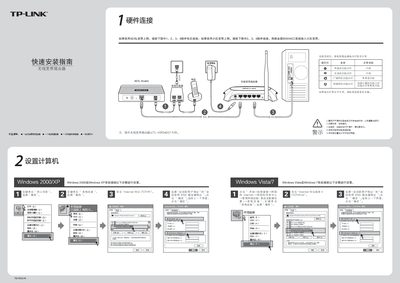
TP-Link WP340G+ Quick Installation Service Manual
This guide provides step‑by‑step instructions for connecting the TP‑Link WP340G+ router to ADSL or cable broadband, checking indicator lights, and configuring basic network settings. It includes hardware wiring diagrams and notes on proper power and placement.
The manual also explains how to access the router’s web interface (default IP 192.168.1.1, username and password both “admin”), set up wireless parameters, and resolve common issues such as missing Wi‑Fi signals or login problems. This manual is written in Chinese.
TP-Link WP340G+ specifications
| Default login username | admin |
|---|---|
| Default login password | admin |
| Default router IP address | 192.168.1.1 |
All TP-Link WP340G+ documents by type
The shortest path to a working setup, usually only a few pages.
Questions answered in these manuals
Why can't my computer find the wireless signal?
Make sure the wireless function on the computer is turned on, the signal strength is sufficient, and the router is positioned to provide good coverage.
How can I reset the router to factory settings?
Press the reset button on the router for about 10 seconds, then release it to restore factory defaults and start the setup again.