
Key facts
- Brand
- Philips
- Model
- MCD302
- Category
- Hi-Fi
- Industry
- Appliances
- Documents
- 2
- Languages
- EN
- Last added
- 2012-03-27
Start here
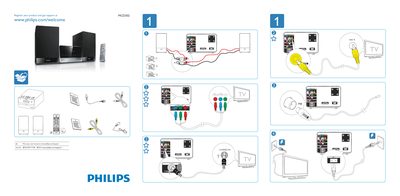
Philips MCD302 Quick Start Guide
The guide explains how to register your Philips MCD302 product and obtain support via the Philips website. It provides the web address www.philips.com/welcome for registration and www.philips.com/support for printing the manual.
It also describes the basic on‑screen menu, including the General Setup page, TV Display options, OSD language selection, and screen saver settings, helping users configure the device quickly.
Philips MCD302 specifications
| USB Interface | USB‑IF #47 |
|---|---|
| Supported Media | DVD, VCD, SVCD, USB |
| MP3 Link | 3.24% |
Source: Philips MCD302 User Manual
All Philips MCD302 documents by type
Day-to-day operation, settings and troubleshooting. Start here if the product is already set up.
The shortest path to a working setup, usually only a few pages.
Questions answered in these manuals
How do I register my Philips MCD302?
Visit www.philips.com/welcome and follow the registration instructions.
Where can I print the user manual for the MCD302?
Print the manual from www.philips.com/support.
How can I register my Philips product for support?
Visit www.philips.com/welcome and register your product.