
Key facts
- Brand
- Philips
- Model
- MCD120
- Category
- Hi-Fi
- Industry
- Appliances
- Documents
- 4
- Languages
- EN
- Last added
- 2012-03-27
Start here
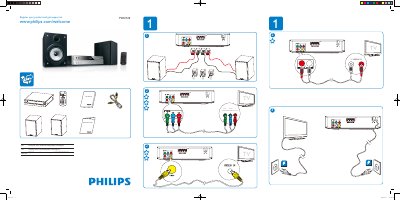
Philips MCD120 Quick Start Guide
The Quick Start Guide helps you register your Philips MCD120 and get support through the Philips website. It provides a brief introduction to the product and points you to online resources for further assistance.
The guide also outlines the system setup options, including TV system selection, screen saver configuration, video settings, TV type, and password rating defaults, enabling you to configure the device quickly for everyday use.
All Philips MCD120 documents by type
Day-to-day operation, settings and troubleshooting. Start here if the product is already set up.
The shortest path to a working setup, usually only a few pages.
Questions answered in these manuals
How do I register my Philips MCD120?
Register your product at www.philips.com/welcomeMCD120.
Where can I find the Quick Start Guide for the MCD120?
The Quick Start Guide is available online at www.philips.com/support.
How do I connect the speakers?
Insert the right speaker wires to “R” and the left speaker wires to “L”, matching the wire colors to the terminals.
What should I do if there is no picture on the TV?
Check that the video cable is correctly connected and that the TV is set to the correct video‑in channel.