
Key facts
- Brand
- Philips
- Model
- 37PFL
- Documents
- 20
- Languages
- EN · ZH · SV
- Last added
- 2012-05-03
Start here
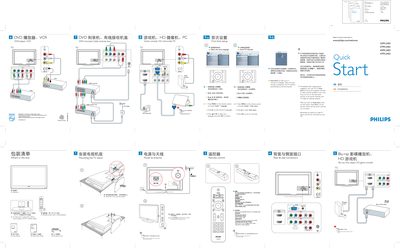
Philips 32PFL3403/37PFL3403/42PFL3403/47PFL3403 TV Quick Start Guide
This guide provides step‑by‑step instructions for first‑time setup of Philips 32‑47PFL3403 TV models. It explains how to connect the AC power cord, mount the TV stand, attach antennas or cable, and use the remote control to navigate menus, select inputs, and adjust settings.
The document also describes the Auto Store feature for scanning and storing broadcast channels, safety notes such as setting a PC monitor to 60 Hz before connection, and details the rear and side connectors (HDMI, audio, video).
Philips 37PFL specifications
| Screen size | 37 inch / 94 cm |
|---|---|
| Resolution | 1920x1080p |
| Brightness | 500 cd/m² |
| Dynamic contrast | 44000:1 |
| Response time | 6 ms |
| Power consumption | 180 W |
| Standby power consumption | 0.15 W |
| HDMI inputs | 4 |
| Integrated tuner | Digital DVB‑T |
| Dimensions (W×H×D) | 940 x 585 x 125 mm |
| Product weight | 18.5 kg |
All Philips 37PFL documents by type
Day-to-day operation, settings and troubleshooting. Start here if the product is already set up.
- Philips 37PFL7603D Flat TV User Manual 3 p
- PHILIPS 32PFL5405H 37PFL5405H 42PFL5405H 32PFL5605H 40PFL5605H 46PFL5605H 52PFL5605H 40PFL5605K 40PFL5805H 46PFL5805H 32PFL6605H 40PFL6605H user manual 63 p
- Philips 32PFL8404H/37PFL8404H/42PFL8404H/47PFL8404H TV User Manual 229 p
- PHILIPS 3139 125 40093 Television user guide(1) 1 p
- PHILIPS 32PFL7422/37PFL7422/42PF7422/47PFL7422/37HF7005 user manual 33 p
- Philips 37PFL9903H/10 42PFL9903H/10 User Manual 70 p
- Philips 32PFL9603 37PFL9603 42PFL9603 42PFL9703 42PFL9803 47PFL9603 47PFL9703 52PFL9703 LCD TV User Manual 68 p
- PHILIPS 32PFL9603 37PFL9603 42PFL9603 42PFL9703 42PFL9803 47PFL9603 47PFL9703 52PFL9703 Manual(1) 66 p
- PHILIPS 32PFL9603 37PFL9603 42PFL9603 42PFL9703 42PFL9803 47PFL9603 47PFL9703 52PFL9703 Manual 66 p
- Philips 32PFL3403 37PFL3403 42PFL3403 47PFL3403 32HFL3330 37HFL3330 TV User Manual 55 p
- Philips 32PFL3403/37PFL3403/42PFL3403/47PFL3403 LCD TV User Manual 28 p
- Philips 32PFL7422/37PFL7422/42PFL7422/47PFL7422 TV User Manual 33 p
- Philips 32PFL7422/37PFL7422/42PFL7422/47PFL7422/37HF7005 Television User Manual 34 p
- Philips 32PFL3403/37PFL3403/42PFL3403/47PFL3403 TV User Manual 29 p
The shortest path to a working setup, usually only a few pages.
Questions answered in these manuals
How many HDMI inputs does the TV have?
The TV provides four HDMI inputs for full digital HD connections.
What is the brightness of the display?
The display brightness is rated at 500 cd/m².
How many people are needed to lift the TV?
Two people are required to lift and carry a TV that weighs more than 25 kg.
From: Philips 32PFL8404H/37PFL8404H/42PFL8404H/47PFL8404H TV User Manual
How do I re‑tune the TV for the digital switchover?
Check the user manual’s section on installing channels and re‑tune the TV every few months or when advised by Digital UK.
From: Philips 32PFL8404H/37PFL8404H/42PFL8404H/47PFL8404H TV User Manual
How do I turn the TV on for the first time?
Connect the AC power cord and press the POWER button on the remote.
From: Philips 32PFL3403/37PFL3403/42PFL3403/47PFL3403 TV Quick Start Guide
How can I set the TV's language?
Press MENU on the remote, choose Install > Language, select your language, and confirm with OK.
From: Philips 32PFL3403/37PFL3403/42PFL3403/47PFL3403 TV Quick Start Guide