
This document introduces the features and characteristics of 32~47PFL3403 QSG.
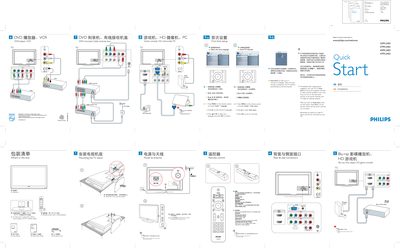
This guide provides step‑by‑step instructions for first‑time setup of Philips 32‑47PFL3403 TV models. It explains how to connect the AC power cord, mount the TV stand, attach antennas or cable, and use the remote control to navigate menus, select inputs, and adjust settings.
The document also describes the Auto Store feature for scanning and storing broadcast channels, safety notes such as setting a PC monitor to 60 Hz before connection, and details the rear and side connectors (HDMI, audio, video).
| Sheet size | 960 mm × 235 mm |
|---|---|
| Folded size | 160 mm × 235 mm |
Connect the AC power cord and press the POWER button on the remote.
Press MENU on the remote, choose Install > Language, select your language, and confirm with OK.
Press MENU, select Install > Auto store, press OK and wait up to three minutes for the scan to finish.
Set the PC monitor refresh rate to 60 Hz before making the connection.