
11G Wireless Access Point setup wizard, includes Windows 2000/XP and Windows Vista/7 system setup steps, introduces how to set computer IP address, wireless access point IP address, wireless network name, wireless password.
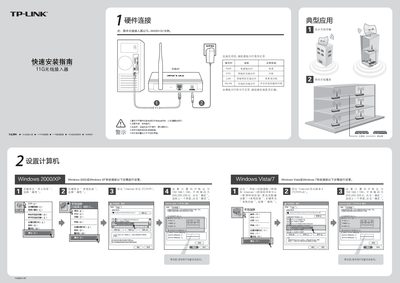
This guide provides step‑by‑step instructions for installing the TL‑WA501G+ wireless access point. It covers hardware connections, indicator LED status, and initial network configuration for Windows systems.
Additional sections explain POE adapter usage, available operating modes (Access Point, Client, Repeater, Bridge, etc.), and troubleshooting tips such as resetting the device and resolving wireless connection issues. This manual is written in Chinese.
| TL-WA501G+ POE Output | 9VDC / 0.6A (up to 40 m) |
|---|---|
| TL-WA701N POE Output | 9VDC / 1.0A (up to 40 m) |
| TL-WAS01N POE Output | 12VDC / 0.5A (up to 60 m) |
Power the device, press and hold the RESET button on the back for 5‑10 seconds, then release.
Check that the computer’s SSID and encryption settings match those configured on the AP.