
Key facts
- Brand
- Philips
- Model
- DVP5990K
- Category
- Player
- Industry
- Appliances
- Documents
- 7
- Languages
- EN · ZH
- Last added
- 2012-03-27
Start here
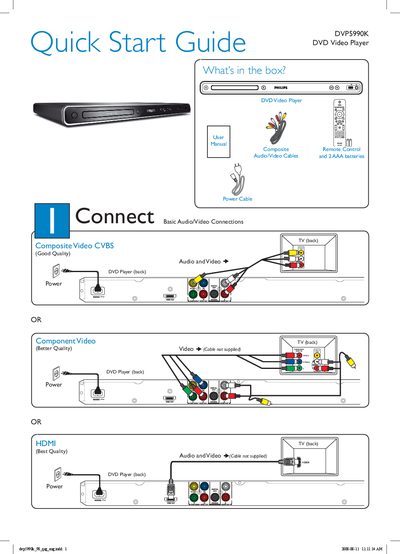
Philips DVP5990K DVD Video Player Quick Start Guide
The guide lists the items included in the box—DVD player, power cable, composite remote control, audio/video cables and batteries—and shows how to connect the player to a TV using composite, component or HDMI cables. It also explains the basic power‑on procedure and how to select the correct TV viewing channel.
Setup steps cover selecting the on‑screen language, using the SETUP menu, and starting disc playback. The troubleshooting section provides quick checks for common issues such as no power, no picture, no sound, HDMI settings, and remote‑control problems.
Philips DVP5990K specifications
| TV Standard | PAL/50Hz, NTSC/60Hz |
|---|---|
| Video DAC | 1‑bit, 108 MHz |
| Video Output | 1 Vpp ~ 75 Ω |
| Vertical resolution | 576 lines (PAL) / 480 lines (NTSC) |
| Power consumption | < 1 W (operating), < 1 W standby |
All Philips DVP5990K documents by type
Day-to-day operation, settings and troubleshooting. Start here if the product is already set up.
The shortest path to a working setup, usually only a few pages.
Questions answered in these manuals
How do I turn on the Philips DVP5990K DVD Player?
Press the power button (marked 5) on the unit.
How can I select the correct viewing channel on my TV?
Use the TV remote to press the Channel Down button repeatedly until the Video In channel appears.
How can I connect the DVD player to a TV for high‑definition video?
Use the HDMI 1080p digital output to connect the player to the TV.
Does the DVD player support karaoke scoring?
Yes, it includes a karaoke scoring function that rates your performance.
What video output does the DVP5990K support?
It supports HDMI 1080p digital video and audio output.
How can I create MP3 files with this DVD player?
Use the one‑key MP3 creation function to convert CD tracks directly to a USB flash drive.