
Key facts
- Brand
- Philips
- Model
- DVP3960
- Category
- Player
- Industry
- Appliances
- Documents
- 4
- Languages
- EN · ZH
- Last added
- 2012-03-26
Start here
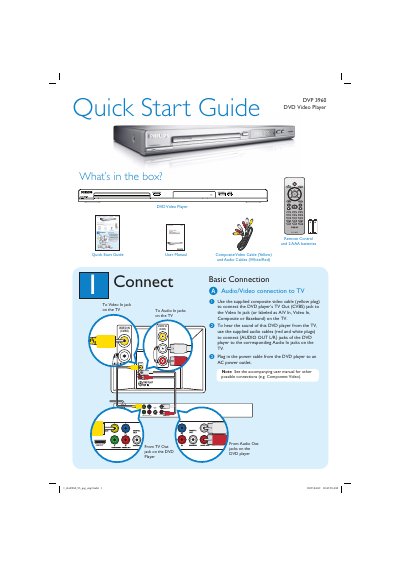
Philips DVP 3960 DVD Video Player Quick Start Guide
This guide shows what is included in the box and how to make the basic audio/video connections to a TV, including composite video, audio L/R, HDMI, component and digital outputs. It also explains how to power the player, select on‑screen, audio and subtitle languages, and start or stop playback.
Additional sections cover finding the correct TV viewing channel, troubleshooting common issues such as no power, no picture or sound, and remote‑control problems, and point users to the full user manual for more detailed information.
Philips DVP3960 specifications
| Video output (CVBS) | CVBS |
|---|---|
| Video output (YPbPr) | YPbPr |
| Audio output | Stereo left/right |
| Supported file formats | DivX, MP3, WMA |
All Philips DVP3960 documents by type
Day-to-day operation, settings and troubleshooting. Start here if the product is already set up.
The shortest path to a working setup, usually only a few pages.
Questions answered in these manuals
How do I set the correct viewing channel for the DVD player?
Press 2 on the DVD player’s remote, turn on the TV, then press 0 on the TV remote and repeatedly press Channel Down until the DVD background appears.
How can I change the language preferences on the DVD player?
Press SETUP on the remote, highlight OSD Language, press X, then press ST and OK to select the desired language.
How do I connect the DVD player to a TV?
Use the CVBS or YPbPr video connectors, or connect via HDMI or an RF modulator as described in the manual.
What clearance should be left around the DVD player for ventilation?
Leave at least 10 cm (4 in) clearance at the rear and top, and 5 cm (2 in) on the left and right sides.
What type of laser does the DVP3960 use?
It uses a semiconductor InGaAIP laser for DVD playback and an AlGaAs laser for CD playback.
What rear connections are available on the DVP3960?
The player provides analog L/R audio, composite video (CVBS), HDMI, digital coaxial, and component video outputs.